
Home Care and Home Safety: Home Monitoring Options for Families
Written by the HomeCare editorial team. Sources: Alzheimer's Association, National Institute on Aging (NIA).
When your parent lives alone, or when you cannot be there all day, the worry does not switch off. Did they get up this morning? Did they eat? Did they fall? Did they leave the house? Home monitoring is a way of answering those questions without moving in or hiring round-the-clock care. It covers a wide range of tools, from a simple pendant alarm to sensors that notice when a door opens, cameras that let you check in from your phone, and a daily phone call from a friendly voice. Used well, monitoring gives the family peace of mind and the parent a safety net. Used badly, it can feel like surveillance, create false alarms, and give a false sense of security.
This guide is written for adult children caring for a parent at home. It explains the main monitoring options in plain language, what each one is good for, what it cannot do, and how to choose a combination that fits your parent, your home, and your family. It also covers the questions families often avoid: privacy and consent. You do not need to buy a whole system at once. Start with the biggest worry, usually a fall or a night-time wander, and add the next piece when the first one is working. If you are new to caring for a parent with dementia at home, start with our complete family guide to dementia care at home and our complete guide to home care, and then come back here for the monitoring details.
What Home Monitoring Means
Home monitoring means knowing, from a distance, that a person at home is safe. It does not mean watching them all the time. The simplest form is a neighbour knocking on the door each morning. The most advanced form is a house full of sensors that learn a person's routine and alert a family member when something changes. Most families need something in between: a personal alarm, a door sensor, and a daily check-in, for example. The right level depends on your parent's needs, how much time they spend alone, and how quickly someone can reach them if something goes wrong.
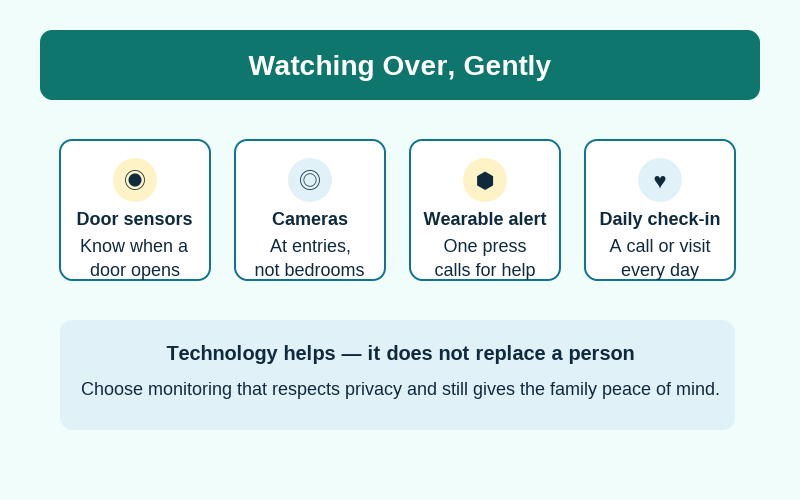
It helps to think of monitoring in three layers. The first layer is your parent calling for help: a pendant, a wristband, or a phone they can use. The second layer is the house noticing something: a door opening at night, no movement in the morning, or a fall. The third layer is a person checking in: a phone call, a visit, or a video call each day. No single layer is enough on its own. A pendant only works if your parent can press it. A sensor only works if someone acts on the alert. A daily call only works if it happens every day. The strongest monitoring is a combination of all three, with a clear plan for who responds to an alert and how quickly they can get there. Our emergency plan guide shows how to write that plan down, and our wandering prevention guide explains the door sensors and alarms that matter most for a person with dementia.
Monitoring is not care. A camera cannot help your parent up after a fall. A sensor cannot make a cup of tea or offer company. A phone call cannot check whether the fridge is empty. Technology can tell you that something has happened, but a person still has to do something about it. Keep that in mind when you are choosing devices, and be honest about how quickly you, a neighbour, or a caregiver can actually reach the house. If the nearest family member lives an hour away, a sensor that sends an alert to their phone is less useful than an alarm that calls a local response service or a neighbour. Monitoring works best when it is part of a care plan that includes people, not when it replaces them.
Start With Needs, Not Devices
Before you buy anything, write down the three things you worry about most. For many families, the list looks like this: a fall when nobody is there, wandering out of the house at night, and a parent who is alone all day and may not eat or drink enough. For other families, the worries are different: a parent who forgets to take medicines, a parent who leaves the cooker on, or a parent who is frightened at night. Your list is your shopping list. Buy only the devices that answer a worry on the list, and ignore the rest, however clever they look in an advertisement.
Next, think about your parent. Can they press a button and remember what it is for? Will they wear a pendant, or will they take it off? Can they hear a phone ringing, and can they answer it? Do they understand what a camera is, and would it frighten them? A person with dementia may not remember what a device is for, may remove it, or may be distressed by a voice coming from a speaker. The best device is the one your parent will actually use and accept, not the most advanced one. If your parent will not wear a pendant, a sensor that needs no action from them, such as a door sensor or a motion sensor, may be a better choice. If your parent loves talking on the phone, a daily call may be more useful than any sensor.
Then think about the house. Is there a reliable internet connection, and does it reach every room? Is there a mobile signal? Are there power sockets where sensors would go? A system that needs Wi-Fi will not work in a house with a weak connection, and a system that needs a hub will not work if there is nowhere to plug it in. Think about who will install the devices, who will change the batteries, and who will respond to an alert at 3 a.m. If the answer to any of those is unclear, the system will fail at the worst moment. Write the answers down, and only then start choosing devices. For the wider safety picture, read our fall prevention checklist and our guide to a calm, familiar home.
Personal Alarms and Wearables
A personal alarm is the simplest and most useful monitoring device for most families. It is usually a pendant worn around the neck or a wristband, with a single large button. Pressing the button connects your parent to a response centre or calls a family member, depending on the system. Some alarms can detect a fall automatically and call for help even if your parent cannot press the button. That feature is valuable, because a person who has fallen and is unconscious, or who is too confused to press a button, cannot call for help on their own. If you buy an alarm, choose one with fall detection if it is available, and make sure your parent understands that pressing the button is not a nuisance.
For an alarm to work, your parent must wear it. That sounds obvious, but it is the most common reason alarms fail. A pendant left on the bedside table is no help in the bathroom, and a wristband taken off because it is uncomfortable is no help at all. Choose a device that is light, comfortable, and waterproof, so it can be worn in the shower, where falls are common. Offer a choice of pendant or wristband, and let your parent choose the colour. Talk about the alarm at a calm time, and explain it in simple words: "If you fall or feel unwell, press this button and someone will come." Practise pressing it together, so your parent knows what happens when the button is pressed, and is not frightened by the voice that answers. Test the alarm every week, and keep the batteries charged or the device charged, according to the instructions. Put the weekly test in your calendar, and write it in the emergency plan.
Other wearables can help in specific situations. A GPS tracker, worn as a watch or carried in a pocket, can show a family member where a person who has wandered is, and can speed up finding them. It is useful for a person with dementia who walks out of the house, but only if someone is watching and able to act, and only if the device is charged and carried. A smartwatch with a heart-rate sensor or a fall detector can add information, but it is more complex to use, needs regular charging, and may confuse a person with dementia. Keep it simple. A device with one button and one job is better than a device with ten features that nobody understands. Ask your parent's doctor or care provider whether a personal alarm is suitable, and which type they recommend. Some services provide alarms as part of a care package, and a provided alarm that is monitored around the clock is better than a bought alarm that calls a phone nobody answers.
Door and Motion Sensors
Sensors are devices that notice things without your parent having to do anything, and that makes them especially useful for dementia care. A door sensor is a small device fitted to a door and its frame. When the door opens, the sensor sends an alert to a phone or sounds a chime. Fit them to the front door, the back door, and the garden gate, so you know when your parent leaves the house. Choose a sensor with a gentle chime, not a loud siren, because a loud alarm can frighten a person with dementia. Test the sensors every month, and change the batteries on a schedule you can remember, such as the first day of each month. Our wandering prevention guide explains door sensors and alarms in more detail.
Motion sensors are fitted in hallways, bedrooms, and living rooms, and they notice when a person moves. They can be used in several ways. A sensor in the hallway that switches on a soft light when someone passes at night can prevent a fall in the dark. A sensor beside the bed that alerts a caregiver when your parent gets up at night can prevent a night-time wander. A sensor in the living room that notices no movement by mid-morning can alert a family member that something may be wrong. Some systems learn a person's routine over a week or two, and then send an alert when the routine changes: no movement in the kitchen by breakfast time, or no movement at all for several hours. That kind of alert is powerful, but it also produces false alarms, for example when your parent is out with a visitor or asleep in a different room. Agree in advance who will check a false alarm, and how, so that alerts are not ignored because they have cried wolf too often.
Other sensors watch the house rather than the person. A smoke alarm, a carbon monoxide alarm, and a flood sensor are all part of home monitoring, and they protect everyone in the house. A sensor that notices when the cooker has been left on, or when the tap has been left running, can prevent a fire or a flood. A bed sensor that notices when a person has not returned to bed can alert a caregiver. When you are choosing sensors, think about what happens after the alert. A sensor that sends a message to a phone is only useful if someone reads the message and can act. A sensor that sounds a chime in the house is only useful if someone is in the house to hear it. Decide who responds, and how quickly, before you fit the sensor.
Cameras at Home
Cameras are the monitoring option families ask about most, and the one that needs the most careful thought. A camera at the front door can show who is visiting, and can let a family member check that a caregiver has arrived. A camera in the living room can let a family member see that a parent is up, moving, and safe. A camera can also record what happened before a fall, which can help a doctor understand what went wrong. Those are real benefits, and for some families they are the reason monitoring works at all.
But cameras have limits and costs. A camera cannot help a person who has fallen. It can only show you that they have fallen, and if nobody is watching at that moment, the fall may not be noticed for hours. A camera in a bedroom or bathroom is an invasion of privacy, and it should never be fitted there. A camera can make a person with dementia anxious or distressed, especially if they do not understand what it is, or if they feel watched. It can also create tension in the family, if one person wants a camera and another does not. Talk about cameras openly, with your parent if you can, and with the whole family. Agree together on where cameras will go, who can watch them, and when. A good rule is to fit cameras only at entries and in shared living spaces, never in bedrooms or bathrooms, and to tell everyone who visits the house that cameras are in use, including professional caregivers.
If you do use cameras, choose a system that is simple and secure. Change the default password, keep the software updated, and make sure only the people who need access have it. A camera system with a weak password can be watched by strangers, and that is a serious risk. Keep the recordings for a short time only, and delete them regularly. Do not share camera footage with anyone outside the family without a good reason. And remember that a camera is not a substitute for a visit. A video image cannot tell you whether your parent has eaten, whether they are warm, or whether they are lonely. It can only tell you what they look like from a distance. Use cameras to support visits and calls, not to replace them. For more on keeping the home safe and calm, read our guides to lighting and flooring and a calm, familiar home.
Daily Check-Ins and Phone Calls
The oldest form of monitoring is also one of the best: a person checking in every day. A phone call each morning, a visit each afternoon, or a video call each evening can tell you more than any sensor. A voice can tell you whether your parent sounds confused, tired, or unwell. A video call can show you whether they are dressed, whether the house is tidy, and whether they have eaten. A visit can check the fridge, the medicines, and the heating. No device can do all of that, and no device can offer company. If you can arrange only one form of monitoring, make it a daily check-in by a person.
Make the check-in regular and reliable. Agree on a time, and keep to it, so your parent expects the call and notices if it does not come. Keep the call short and warm, and ask the same simple questions each day: Did you sleep well? Have you eaten? Have you taken your medicines? Is everything all right? Write the answers in a notebook, so you can notice changes over days and weeks. A parent who always answers cheerfully and then one day sounds confused, or does not answer at all, needs a visit, not another call. Agree in advance what happens if the call is not answered: who goes to the house, and how quickly. A neighbour with a key, a family member nearby, or a care service that will visit can all fill that role, but it must be agreed in advance, not decided in a panic.
Privacy, Consent, and Dignity
Monitoring raises a question that families often find difficult: how much watching is too much? Your parent is an adult, with a right to privacy and dignity, even when they have dementia. A camera in the bedroom, a tracker they do not know about, or a sensor that records every movement can feel like surveillance, and it can damage trust. Talk about monitoring with your parent, if you can, at a calm time, and explain it in simple words: "This button is so you can call me if you fall. This sensor is so I know if you go out at night. This camera is at the front door, so I can see who visits." Offer choices where you can: a pendant or a wristband, a camera at the door or no camera at all. A person who chooses monitoring is far more likely to accept it than a person who has it imposed on them.
If your parent cannot understand or consent, talk to the whole family, and agree together on what is proportionate. Use the least intrusive option that meets the need. A door sensor is less intrusive than a camera. A daily phone call is less intrusive than a sensor in every room. A personal alarm that your parent controls is less intrusive than a tracker they do not know about. Keep the monitoring focused on safety, not on watching. Do not use cameras or sensors to check up on a caregiver, or to settle a family argument. Tell everyone who visits the house, including professional caregivers, that monitoring is in use, and where. A caregiver who does not know they are being watched may feel spied on, and that damages the trust that good care depends on.
Choosing a System That Fits
When you are ready to choose, start with the worries on your list, and match each worry to one device. A fall when alone calls for a personal alarm with fall detection. Wandering at night calls for door sensors and a bed sensor. Being alone all day calls for a daily check-in and a motion sensor that notices no movement. A cooker left on calls for a cooker shut-off device. Do not buy a system that does everything, because it will do nothing well, and it will be too complicated for anyone to use. Buy one device, fit it, test it for a week, and then decide whether you need the next one.
Ask the practical questions before you buy. Does the device need Wi-Fi, a mobile signal, or a landline? Does it need a monthly subscription, and what does the subscription cover? Who answers the alarm, and how quickly? What happens if the power or internet fails? How long do the batteries last, and who changes them? Is the device waterproof? Is it easy to use with stiff hands or poor eyesight? Can it be returned if it does not suit your parent? Get the answers in writing, and keep them with the plan. If a company will not answer these questions clearly, do not buy from them. Ask your care provider, your parent's doctor, or a local carers' organisation for recommendations, because they will know which systems work well in practice, not just in an advertisement.
Think about cost honestly. Some devices are cheap to buy but expensive to run, because of a monthly subscription. Others are expensive to buy but cheap to run. Add up the cost over a year, not just the price on the box, and compare it with the cost of care. A note on cost: the CareScout median cost for home care is $35 per hour (2025), according to CareScout's cost of care survey. Monitoring can reduce the hours of care needed, but it cannot replace them, so budget for both. Do not buy a system you cannot afford to keep running, because a subscription that lapses leaves a device that does not work, and a device that does not work is worse than no device, because it gives a false sense of safety. If cost is a concern, ask about loans, rentals, or services provided by the local council or a charity.
Frequently Asked Questions
What is the single most useful monitoring device? A personal alarm with fall detection, worn as a pendant or wristband, is the most useful device for most families, because it lets your parent call for help and can call automatically after a fall. It only works if your parent wears it and the batteries are charged, so test it every week.
Are cameras a good idea for a parent with dementia? They can help at entries and in shared living spaces, but never in bedrooms or bathrooms. Talk about them with your parent and the family, tell caregivers they are in use, and remember that a camera cannot help someone who has fallen. It can only show you that they have fallen.
Do sensors replace visits and phone calls? No. A sensor can tell you that something has happened, but only a person can help, offer company, or check whether your parent has eaten. A daily check-in by a person is still the most valuable form of monitoring.
How do I handle false alarms from motion sensors? Agree in advance who will check an alert and how, and expect some false alarms, for example when your parent is out with a visitor. If alerts are ignored because they cry wolf too often, the system has failed, so adjust the sensors or the routine.
What if my parent refuses to wear an alarm or be monitored? Talk about it at a calm time, offer choices, and use the least intrusive option that meets the need. A door sensor or a daily phone call may be acceptable when a camera or a tracker is not. If refusal continues, talk to the family and the care provider about other ways to keep your parent safe.
Sources and Further Reading
This guide draws on the following sources, all accessed 29 November 2026.
- Alzheimer's Association — Facts and Figures, and information on dementia care at home. alz.org/alzheimers-dementia/facts-figures
- National Institute on Aging (NIA) — information on Alzheimer's disease, dementia, and caregiving. nia.nih.gov/health/alzheimers-and-dementia
If this guide helped you, please share it with another family who needs it, and read our other guides on dementia care and home safety, including our emergency plan for seniors and our wandering prevention guide. If you would like to talk about care for your parent, start on our homepage, read more about who we are and how we work, or contact us — a friendly advisor is ready to listen, with no obligation. You can write to us at hello@homecare.biz.id.
Tags: home care safety, home monitoring, family caregiver
Last reviewed: 27 June 2026. This guide is general information and is reviewed regularly. It is not a substitute for medical advice. Always talk to a doctor about diagnosis, treatment, or any change to care or medication.